



An announcement is a statement made for the student, which gives information about something that has happened or will happen. This article is about how to get announcements from teachers in Edu Hartabadi.
Announcements in the Edu Hartabadi are used to deliver important messages from teachers to students. Being able to get announcements from teachers can help you be more prepared for class, and make it easier to follow along with class readings.
That’s why we’ve made it easy for students to get announcements directly in the Edu Hartabadi. The announcement is also a process for teachers to get in touch with students. Here I will show you how can get the Edu Hartabadi teacher’s announcement.
- Step 1. To get the Edu Hartabadi announcement, first, you need to log in to your account with your login details.
- Step 2. After that, click on Enrolled Courses from the dashboard menu.
- Step 3. Now select any of your courses.
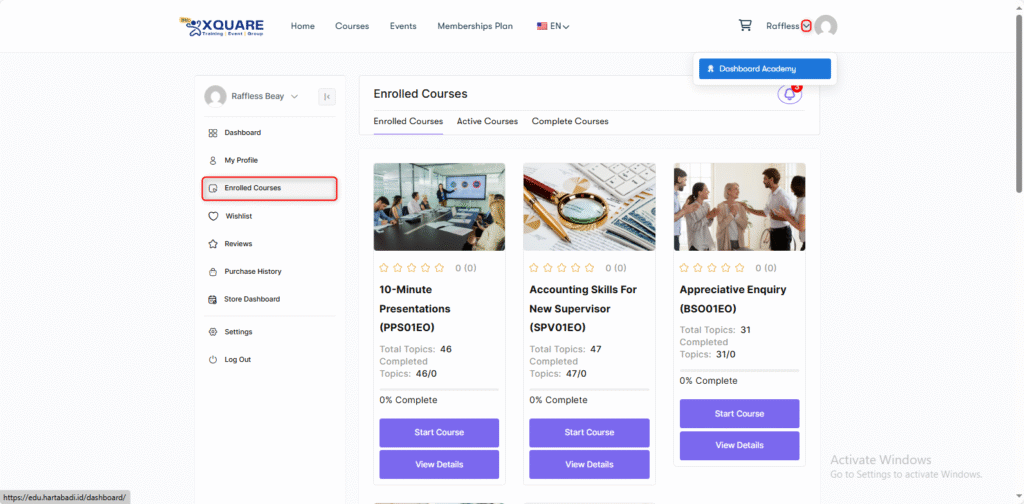
- Step 4. After selecting your course, start the course.
- Step 5. After you start the course now click on the Announcements under the course lessons page you will get your all announcements from the following place.
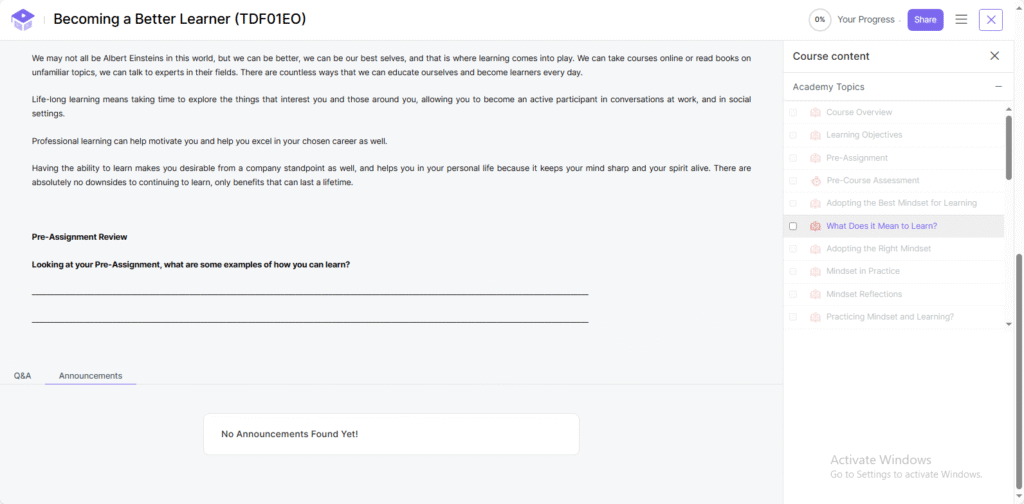
This is all about the announcement.
Edu Hartabadi announcement is a powerful tool to help keep your students informed and aware of the different changes that may be impacting their learning.


